Ratter Studios
My contributions to Ratter
Programmer & Tech Lead (internship), May 2026 to present
The Stockholm1646 teaser trailer, animated in Unreal Engine by Patric Svedberg.
Ratter Studios is a small team of historians and game developers. Our first game, Stockholm1646, is a cinematic historical RPG. You play Ingrid, a maid at the inn “Blå Örn” on Järntorget in 1646 Stockholm, where you man the bar, serve drinks and coax secrets out of the guests. The game is built in Unreal Engine 5.8 with C++ and Blueprints.
I wrote more than half of the game’s C++, I lead the technical side of the project, and I built the studio’s website. This page goes through that work. Each part has a short summary, and the collapsible sections hold the code and the details.
Highlights
- AI NPCs that run entirely on the player’s PC. A language model, speech recognition and text-to-speech all ship inside the game, with no cloud, no Python and no cost per reply. On an RTX 4060 Ti, the first words of a reply in an ongoing conversation appear about a third of a second after you press Enter, while the game renders on the same GPU.
- The gameplay foundation. Interaction, carrying items, the player character, the NPC base class and data table, beer pouring, cleaning, and making the inn level playable.
- Playtesting from start to finish. Five public playtest builds so far, an in-game feedback form, a loading screen that waits for shaders and AI, and a download and feedback pipeline on the website.
- ratterstudios.com. A prerendered TanStack Start site on GitHub Pages, with Cloudflare Workers handling game downloads and tester feedback.
- Tech lead. The GitHub organization and everything Git related, conventions, engine upgrades, merging the team’s work, and packaging.
The AI NPC system
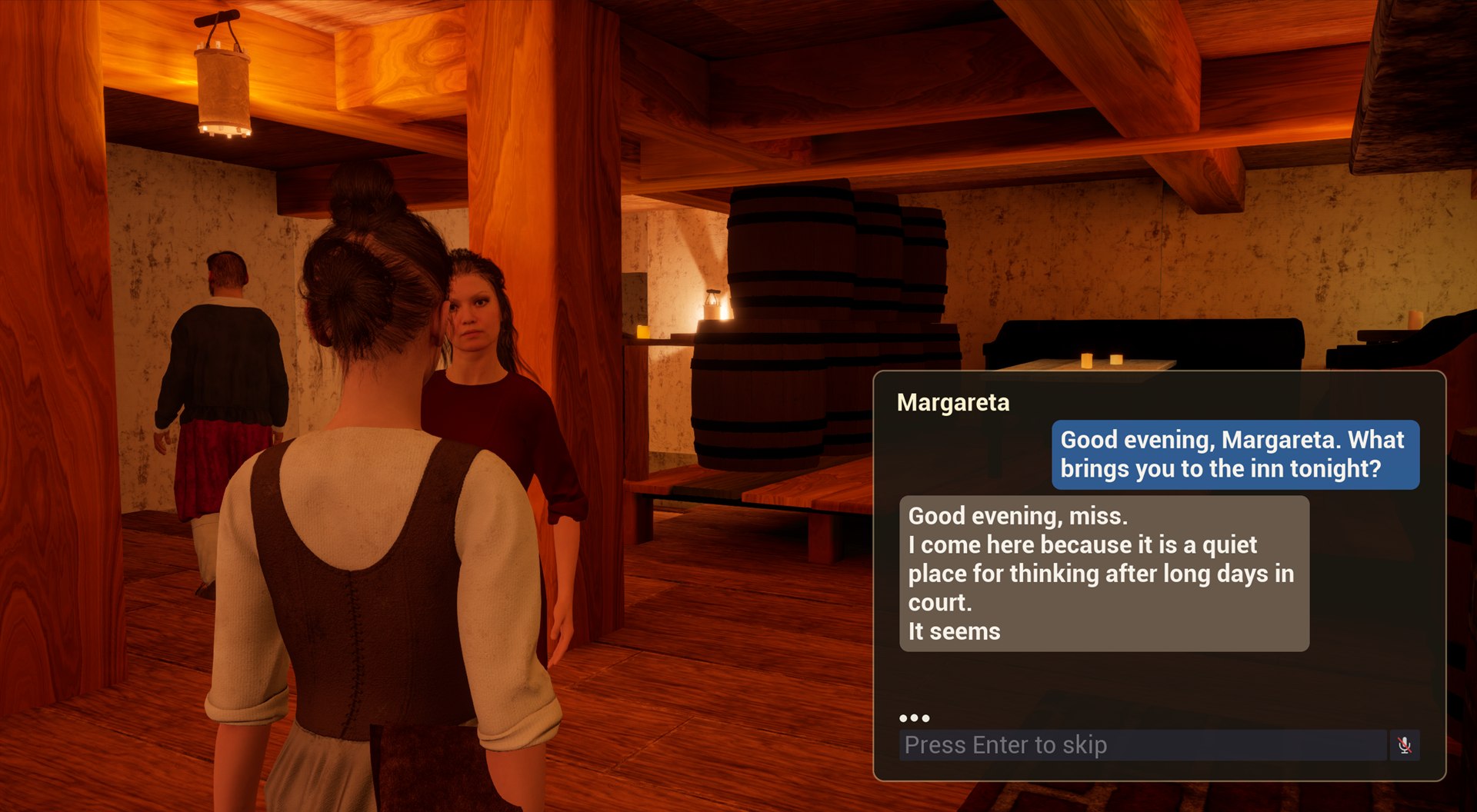
A real reply mid-stream. The text is revealed as the voice reaches each word, and the dots show that more is coming.
Every guest at the inn is someone you can talk to by typing or speaking. They answer in character and out loud, and the text is written out as they speak.
Our AI team started out with a Python and Ollama sandbox for trying out prompts. That was never going to ship: a cloud model bills per reply, which does not suit a game you buy once, and players should not need a Python install to run a game. So the AI team and I built NPCChat, an Unreal plugin that runs everything locally, with the prompt logic ported into a C++ dialogue backend. Three small servers ship with the game as child processes:
| Unreal subsystem | Talks over | Child process | Model and device |
|---|---|---|---|
UNPCChatSubsystem |
HTTP with SSE streaming | llama-server (llama.cpp, Vulkan) |
Qwen3.5-4B Q4_K_M, GPU |
UNPCVoiceSubsystem |
Binary protocol over pipes | npc-tts (my own exe around sherpa-onnx) |
Kokoro v1.0, CPU |
UNPCSpeechSubsystem |
HTTP multipart | whisper-server (whisper.cpp) |
small.en q8, CPU |
This is what happens for one line of dialogue:
- The line comes in through the chat box or the microphone, and goes through a fast language check.
UAIDialogueBackendbuilds the message list from the fixed instructions, the chat history and a memory note, then fits it to the context window.llama-serverstreams tokens back over SSE, and the backend cleans them up and reports partial replies.- Each finished sentence goes to the voice process. The audio comes back over a pipe and is queued on a procedural sound wave at the NPC’s head.
- The text on screen follows the voice, word by word.
Running a language model inside a game
UNPCChatSubsystem is an engine subsystem that owns the server process. A packaged game starts the server at launch behind the loading screen, and the editor starts it when you press Play. Chats queue up until the server reports healthy, so gameplay code never has to care whether the model is ready.
Process lifetime, security and shipping the model
- Lifetime. The server is assigned to a Windows job object with
JOB_OBJECT_LIMIT_KILL_ON_JOB_CLOSE. If the game crashes or gets killed from Task Manager, Windows closes the job and the model leaves VRAM with it. No orphaned 3 GB process is left behind. - Security. The server only listens on
127.0.0.1, on a free port found with a socket bind probe, and every launch generates a new random API key. Nothing else on the PC can use it. - Shipping.
Build.csstages the executables, DLLs and models asNonUFSruntime dependencies, so they sit next to the game as plain files instead of inside the pak. - The model in the repo. The language model is too large to be worth keeping in version control, so the editor downloads it on first use. The download resumes from a
.partfile with HTTP Range requests, gets verified with SHA-256 on a worker thread using BCrypt, and is only renamed once it passes. Packaged builds never download anything.
void* NPCChatProcess::TieToGame(FProcHandle& process)
{
	HANDLE job = CreateJobObjectW(nullptr, nullptr);
	if (job != nullptr)
	{
		JOBOBJECT_EXTENDED_LIMIT_INFORMATION limits = {};
		limits.BasicLimitInformation.LimitFlags = JOB_OBJECT_LIMIT_KILL_ON_JOB_CLOSE;
		SetInformationJobObject(job, JobObjectExtendedLimitInformation, &limits, sizeof(limits));
		AssignProcessToJobObject(job, process.Get());
	}
	return job;
}
The launch arguments look like this:
llama-server -m <model> --host 127.0.0.1 --port <free port> --api-key <random>
  -c 16384 -np 1 --no-webui --reasoning off
  -ctk q8_0 -ctv q8_0 --fit-target <MB kept free for the game>
  --ctx-checkpoints 4 --cache-ram 1024 --slot-save-path <saved read-aheads>
Sharing one GPU with the game
The renderer and the model compete for the same VRAM and GPU time, so placement is decided at launch. llama.cpp only counts its own memory and would happily fill the card, so --fit-target reserves 4 GB for the game, and smaller cards move model layers to the CPU. The context memory is stored in a compact quantized format, integrated GPUs run the model on the CPU because their shared memory turned out to be much slower, and the frame rate is capped while the model is generating so that it gets GPU time.
Raising the server's GPU priority
Windows favours the focused window on the GPU, which starves a hidden background process while you play. The fix is a scheduling priority call that only has a header in the driver kit, so it gets looked up by name. It also only works after the server has opened the GPU, which is why it runs again once the server is ready.
// Windows favours the focused window on the GPU, which starves the hidden server while you play.
using FSetGpuPriorityClass = LONG(WINAPI*)(HANDLE, INT);
constexpr INT GpuPriorityHigh = 4;
LONG gpuStatus = -1;

// Only the driver kit has a header for this gdi32 call, so it is looked up by name.
if (HMODULE gdi = GetModuleHandleW(TEXT("gdi32.dll")))
{
	if (const FSetGpuPriorityClass setGpuPriority = reinterpret_cast<FSetGpuPriorityClass>(
		reinterpret_cast<void*>(GetProcAddress(gdi, "D3DKMTSetProcessSchedulingPriorityClass"))))
	{
		gpuStatus = setGpuPriority(process, GpuPriorityHigh);
	}
}
Streaming replies
Replies arrive as server-sent events. The HTTP thread only appends raw bytes to a locked buffer, and the game thread parses complete events each tick. Blueprints and UI get partial text, so an NPC starts answering long before the model has finished.
The stream buffer
TSharedPtr<FNPCChatStreamBuffer, ESPMode::ThreadSafe> buffer = MakeShared<FNPCChatStreamBuffer, ESPMode::ThreadSafe>();
chat.Stream = buffer;
chat.Request->SetResponseBodyReceiveStreamDelegateV2(FHttpRequestStreamDelegateV2::CreateLambda(
	[buffer](void* data, int64& length)
	{
		FScopeLock lock(&buffer->Lock);
		buffer->Bytes.Append(static_cast<const uint8*>(data), static_cast<int32>(length));
	}));
Making replies fast with the prompt cache
The biggest speed gain did not come from the model, but from not making it read. llama.cpp reuses the longest token prefix it has already processed, so one change early in a prompt forces it to read everything after that point again. I designed the whole prompt layout around this, and made the NPC instructions efficient so there is less to read in the first place.
Keeping the prefix stable
- Instructions stay fixed per NPC. Rules, world, character sheet and backstory go first, and things that change during play moved out of them.
- Changing state goes in a memory note on the newest player line. A system message would have been the natural place, but the model’s chat template rejects a system message that is not the first one. Earlier notes are resent byte for byte, so the history stays a matching prefix.
- The note is ordered by how often things change. Quest directions change rarely and come first, so most of the note is only read once.
- The history window jumps instead of slides. Sliding by one line would change the start of the history on every reply. Dropping half at a time means long chats only re-read now and then.
The result, straight from the log of the conversation in the screenshots above. On the second line only 65 of the 2961 tokens were new:
Response time: 1.32 s (first words after 0.99 s)
prompt: 2900 tokens (2665 already read, 2665 of them loaded from the saved read-ahead)
reply: 37 tokens

Response time: 0.66 s (first words after 0.33 s)
prompt: 2961 tokens (2896 already read)
reply: 26 tokens
Saving read-aheads to disk
The loading screen has the model read each NPC’s instructions before the player can talk to them, and the resulting state gets saved with llama-server’s slot save endpoint. Later launches restore it in about a tenth of a second instead of spending seconds reading. The file name is a SHA-1 of the instructions, model, context size, memory format and server executable size, so a changed prompt or a new server can never restore stale state.
For this to work, the saved state has to end exactly where a real chat diverges. Rather than guessing how the chat template wraps the system message, I let the server render it with a marker in place of the first player line and cut the text at the marker:
// The chat template turns the instructions into the exact text every chat with this NPC starts with. The marker is where the first line would go.
static const FString Marker = TEXT("QQREADAHEADQQ");
const TArray<FNPCChatMessage> templateMessages = { chat.Messages[0], FNPCChatMessage(ENPCChatRole::User, Marker) };

// ...POST to /apply-template, then in the response:
const int32 markerAt = prompt.Find(Marker, ESearchCase::CaseSensitive);
ReadInstructions(*pending, markerAt != INDEX_NONE ? prompt.Left(markerAt) : FString());
// Reads exactly the instructions and writes nothing, so a chat can carry on from here without rewinding.
TSharedRef<FJsonObject> body = MakeShared<FJsonObject>();
body->SetStringField(TEXT("prompt"), prefix);
body->SetNumberField(TEXT("n_predict"), 0);
body->SetBoolField(TEXT("cache_prompt"), true);
Fitting long conversations into the context
The context window holds 16,384 tokens, and a long chat with memories can outgrow it. FitToContext removes things in order of least importance, and cuts to three quarters of the budget so that the next few replies can reuse what the model already read. The token estimate uses a chars-per-token ratio calibrated from the real counts the server reports. If it is still wrong, the server’s overflow error gives the true size and the request is retried once.
The trimming order in FitToContext
Notes on older lines go first, with the newest line carrying the whole current note. Then come the steps below:
// Cutting to well below the limit lets the next few replies reuse what the model has already read.
const int32 target = budget * 3 / 4;

// Then old exchanges, but the last two stay, since they matter most for the next answer.
while (CountPlayerLines() > 3 && EstimateTokens(messages) > target)
{
	DropOldestExchange();
}

// Then the oldest earlier conversations in the note.
for (int32 earlierChars = newestNote.Len() / 2; EstimateTokens(messages) > target && earlierChars > 0; earlierChars /= 2)
{
	const FString shorterNote = BuildMemoryNote(request, earlierChars);
	messages.Last().Content = shorterNote + TEXT("\n\n") + newestLine;
	if (noteLog.Notes.Num() > 0)
	{
		noteLog.Notes.Last() = shorterNote;
	}
}

// Last, the two kept exchanges, only if the chat still does not fit at all.
while (messages.Num() > 2 && EstimateTokens(messages) > budget)
{
	DropOldestExchange();
}
A language check that costs almost nothing
The guests only understand English, so anything else has to come across as unintelligible to them. Linda Winther built the original check as a JSON classifier, which meant a full model pass on every line before the NPC could start answering. I put two cheaper stages in front of it. A word list in C++ clears ordinary English with no model call at all, an unclear line gets a one-token answer constrained by a grammar, and only a likely foreign line reaches the full classifier.
The one-letter check
FNPCChatSendOptions options;
options.LogStyle = ENPCChatLogStyle::Silent;
options.TemperatureOverride = 0.f;
options.SeedOverride = 7;
if (bEnglishCheck)
{
	options.MaxTokens = 64;
	options.ResponseFormat = FDialogueLanguagePolicy::ResponseFormat();
}
else
{
	options.MaxTokens = 1;
	options.Grammar = FDialogueLanguagePolicy::LetterGrammar();
}
Voices
NPCs speak with Kokoro v1.0 through sherpa-onnx, in a small executable of my own. It has to run out of process because ONNX Runtime versions collide inside the game: Windows 11 has its own copy in System32, and MetaHuman’s neural network plugin loads another. Each finished sentence goes off to the voice while the model writes the next one, so speech starts well before the reply is done. The audio plays from a USoundWaveProcedural on an audio component at the NPC’s head socket, with natural distance falloff, so voices come from a place in the room.
The pipe protocol and read-along text
Requests are one line on stdin: id TAB speaker TAB speed TAB text. Answers are binary on stdout, over 4 MB pipes:
// "NTTS", then id, sample rate and sample count as int32, then the 16-bit mono samples.
void WriteAnswer(int32_t id, int32_t sampleRate, const float* samples, int32_t count)
{
	fwrite("NTTS", 1, 4, stdout);
	WriteInt(id);
	WriteInt(sampleRate);
	WriteInt(count);
	for (int32_t index = 0; index < count; ++index)
	{
		float sample = samples[index];
		sample = sample > 1.f ? 1.f : (sample < -1.f ? -1.f : sample);
		const int16_t pcm = static_cast<int16_t>(sample * 32767.f);
		fwrite(&pcm, sizeof(pcm), 1, stdout);
	}
	fflush(stdout);
}
The player keeps a timeline of queued sentences, and the widget reveals a word once the voice has reached it. On a slow PC the voice can fall behind the text, so after 1.5 seconds without progress the text carries on at reading pace instead of waiting.
int32 UDialogueVoicePlayer::GetSpokenChars() const
{
	const double now = FPlatformTime::Seconds();
	int32 spoken = 0;
	for (const FSentence& sentence : Sentences)
	{
		if (!sentence.bQueued || now < sentence.StartTime)
		{
			break;
		}

		if (now < sentence.StartTime + sentence.Duration)
		{
			// Spread evenly over the sentence; close enough for whole words.
			const double progress = (now - sentence.StartTime) / FMath::Max(sentence.Duration, 0.01);
			return sentence.StartChar + FMath::FloorToInt32(progress * (sentence.EndChar - sentence.StartChar));
		}
		spoken = sentence.EndChar;
	}
	return spoken;
}
Speech input
whisper.cpp’s server runs on the CPU on purpose, since the GPU is already shared between the game and the language model. UVoiceDictation captures the mic with Audio::FAudioCapture, resamples it to 16 kHz and finds speech with my own energy-based voice activity detection. The current utterance gets re-read every half second for live partial text. NPC names are passed in as hints so they come out spelled correctly, and the mic is muted while the NPC speaks so it never hears itself. You can use the mic button in the chat panel, or hold R to talk to the nearest NPC anywhere in the inn with subtitles on the HUD.
Voice activity detection with an adaptive noise floor
The noise floor follows quiet sound quickly and loud sound slowly, so a noisy room raises it but talking does not. Speech has to stay above it for a few 20 ms frames to start an utterance, and 300 ms of pre-roll keeps the first syllable from getting cut off.
const float db = 10.f * FMath::LogX(10.f, FMath::Max(sumSquares / frame.Num(), 1e-10f));

// Follows quiet sound quickly and loud sound only slowly, so talking does not raise it.
NoiseFloorDb += (db - NoiseFloorDb) * (db < NoiseFloorDb ? 0.3f : 0.002f);
NoiseFloorDb = FMath::Clamp(NoiseFloorDb, -90.f, -30.f);

const float threshold = FMath::Max(NoiseFloorDb + SpeechAboveNoiseDb, MinSpeechDb);
const bool bLoud = db > threshold;
Drunk NPCs
You work at a bar, so guests get drunk. Each NPC has a value from 0 to 100, and the instructions get an effect for the current level, from relaxed through rambling and slurring to complete nonsense. A small model is not reliable at writing slurred text though, so C++ does that part on the finished words. Each word gets its own seed from the reply and its position, so words do not change while the reply streams in. A guard also rolls a word back if slurring turned it into a swear word the NPC would not use, and the voice slows down by up to 15%.
Stable randomness while streaming
if (bComplete && bPlainWord)
{
	// Seeded per word, so the same reply always comes out the same while it is written.
	FRandomStream random(static_cast<int32>(HashCombineFast(seed, GetTypeHash(wordIndex))));
	const FString original = word;
	if (random.FRand() < slurChance)
	{
		word = SlurWord(word, random);
	}
	if (random.FRand() < misspellChance)
	{
		word = MisspellWord(word, random);
	}
	// ...
}
Measuring it
Every playtest gives us data. The dialogue log records the context use, the new and reused tokens for each exchange, and the player’s hardware, and the feedback form includes the same hardware line. That is how I can tell why a reply was slow on a tester’s PC without having that PC. Logs are written on a pool thread, so the disk never stalls the game.
Lily Clairevelle and Linda Winther built the long-term memory, quests and evaluation tools on top of this system, and much of the prompt writing comes from the AI team. All prompts live in BP_AIDialogueBackend and the DT_NPCs data table, so they can be changed without touching C++.
The dialogue framework and UI
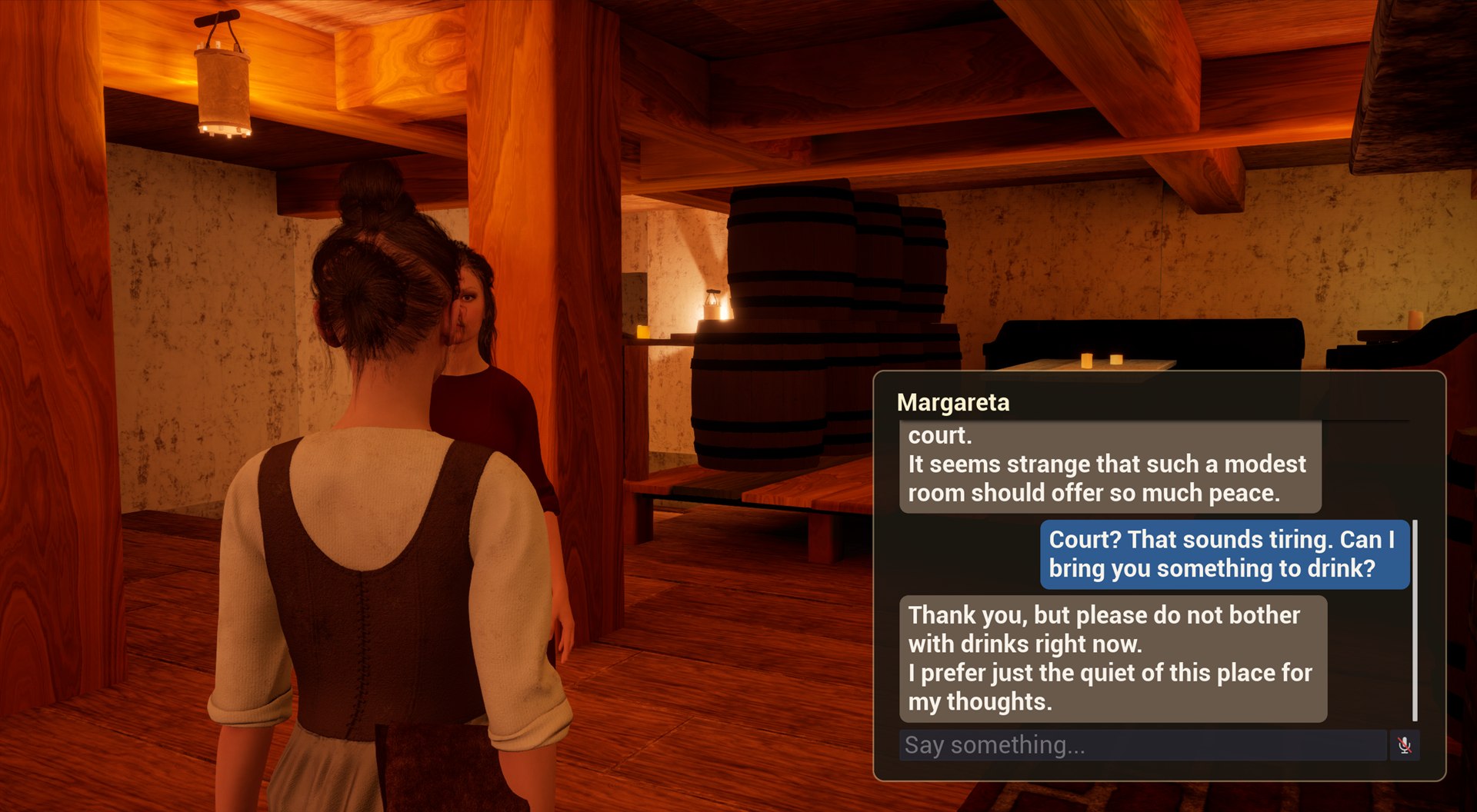
The AI plugs into a dialogue framework I built first. A UDialogueComponent goes on any actor, a UDialogueSubsystem routes requests and keeps track of conversations, and replies come from a swappable UDialogueBackend, so a placeholder could be replaced by the real model without touching anything else. Each NPC’s persona comes from a data table row.
The chat panel is a messaging-style UMG widget with bubbles created at runtime and aligned by speaker, an animated typing indicator, and Enter to skip the text reveal. A focused text box swallows most keys, so Escape is handled by a Slate input preprocessor, and focus is restored on tick with a guard for the game viewport so the game never steals focus from the editor. OnTalkingChanged drives the talking state in the animation Blueprint, and NPCs stop and turn to face you when you talk to them.
Gameplay systems
Interaction
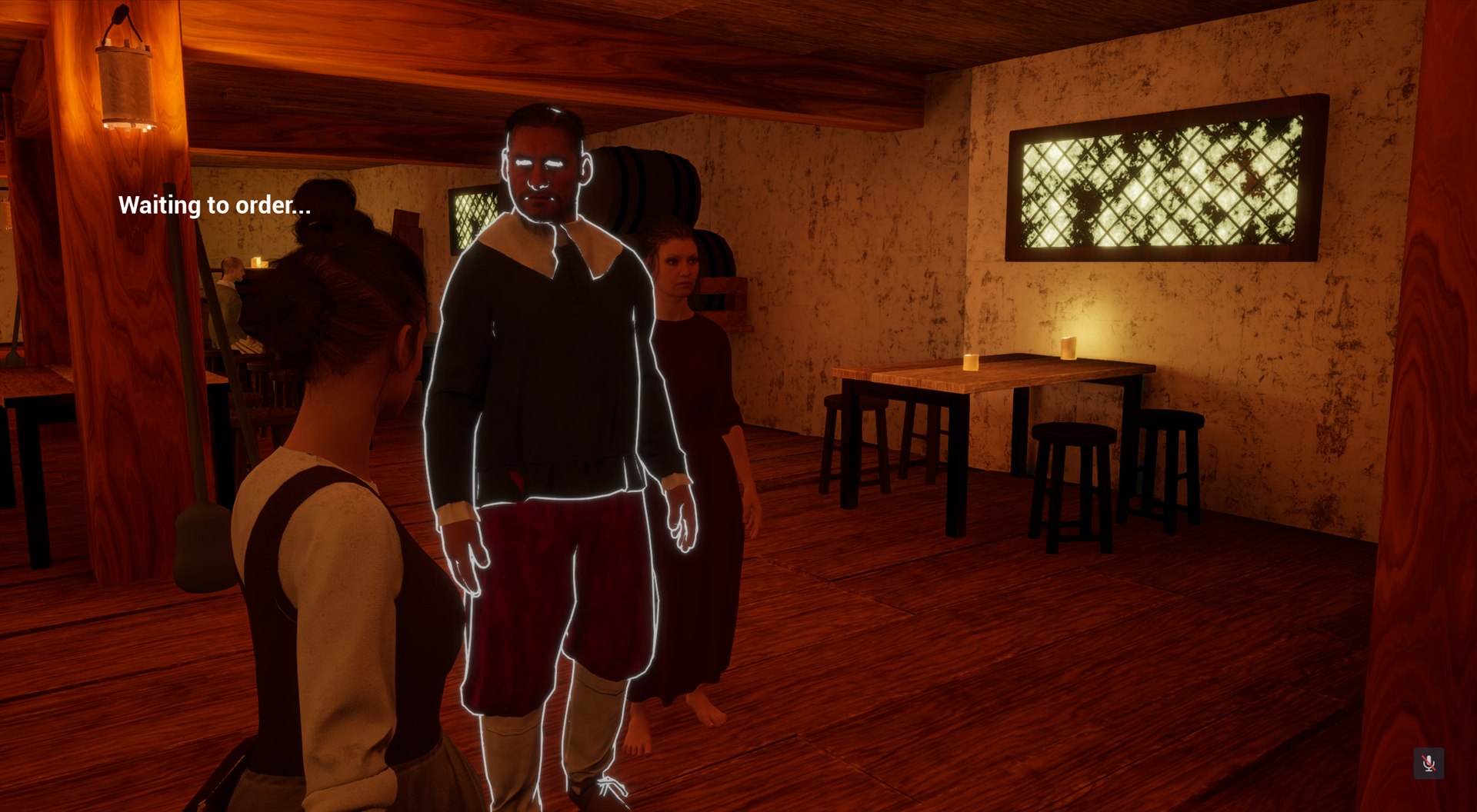
I built the interaction system in C++ as a component on the player. It looks for interactables in a cone in front of Ingrid, measures reach to the nearest surface of each one, and checks line of sight so nothing can be used through walls. Each candidate gets a score for how centered and how close it is. The best one gets an outline, and pressing interact calls into it through a C++ interface that each object implements in Blueprint.
// Aim still uses the direction to the probe's center.
const FVector ToCenter = ProbeCenter - Origin;
const float Dot = ToCenter.IsNearlyZero() ? 1.f : FVector::DotProduct(ViewDir, ToCenter.GetSafeNormal());
if (Dot < ConeCos)
{
	continue; // outside the interaction area
}

// Normalise both factors to 0 - 1, then weight them.
const float LookScore = (Dot - ConeCos) / (1.f - ConeCos);
const float DistScore = 1.f - (Dist / InteractRange);
const float Score = AimWeight * LookScore + ProximityWeight * DistScore;
The player and carrying items
AStockholmCharacter is the C++ base for BP_Player, with movement, crouching and the camera setup. Items are picked up and dropped with physics, one at a time, and a flag on each item decides whether it occupies Ingrid’s hands.
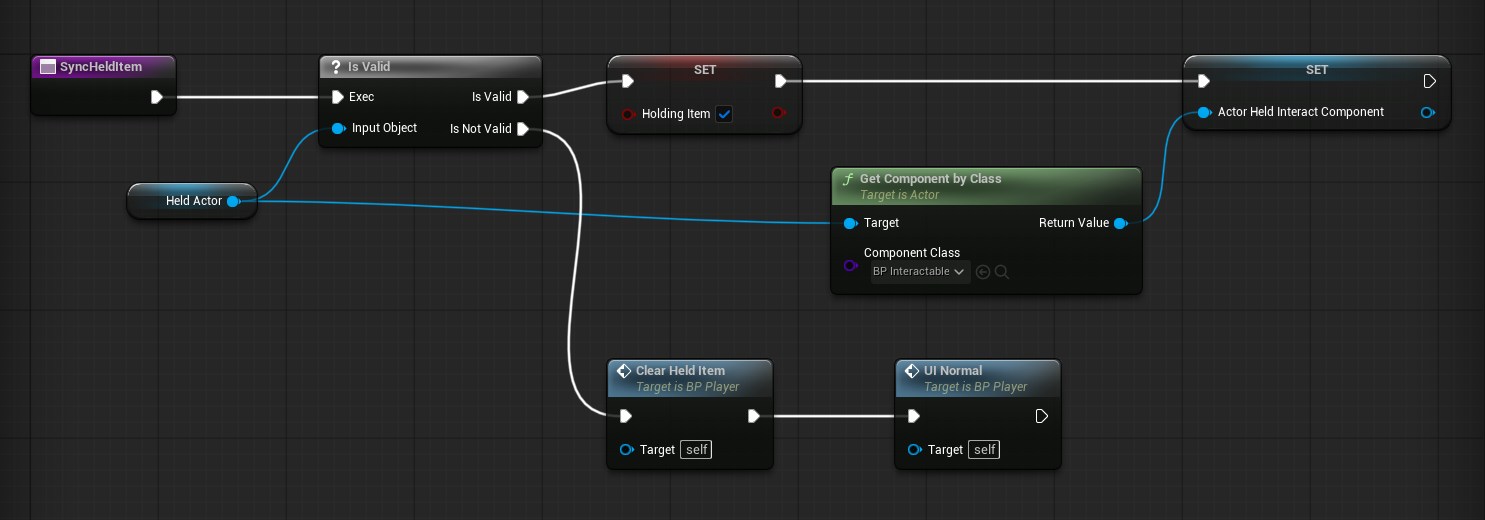
SyncHeldItem in BP_Player keeps the holding state and the held item's interact component in step.
NPCs
I moved BP_NPCBase from Actor to Character and built DT_NPCs, the data table that defines every NPC: MetaHuman body, face, clothing, groom and binding pairs, persona and voice. Hair disappearing at mid-range turned out to be because our grooms only have geometry at LODs 1, 3, 5 and 7, which I fixed with a custom LODSync mapping.
The inn
- Beer pouring at the bar, driven by a timer-based C++ component.
- Sweeping with the broom, and finishing the cleaning system with its dirt spawning and respawn timing.
- A tutorial chain for the first playtests that walks testers through each mechanic.
- Making
LV_Innplayable, with fully dynamic lighting under Lumen.
Playtest tools
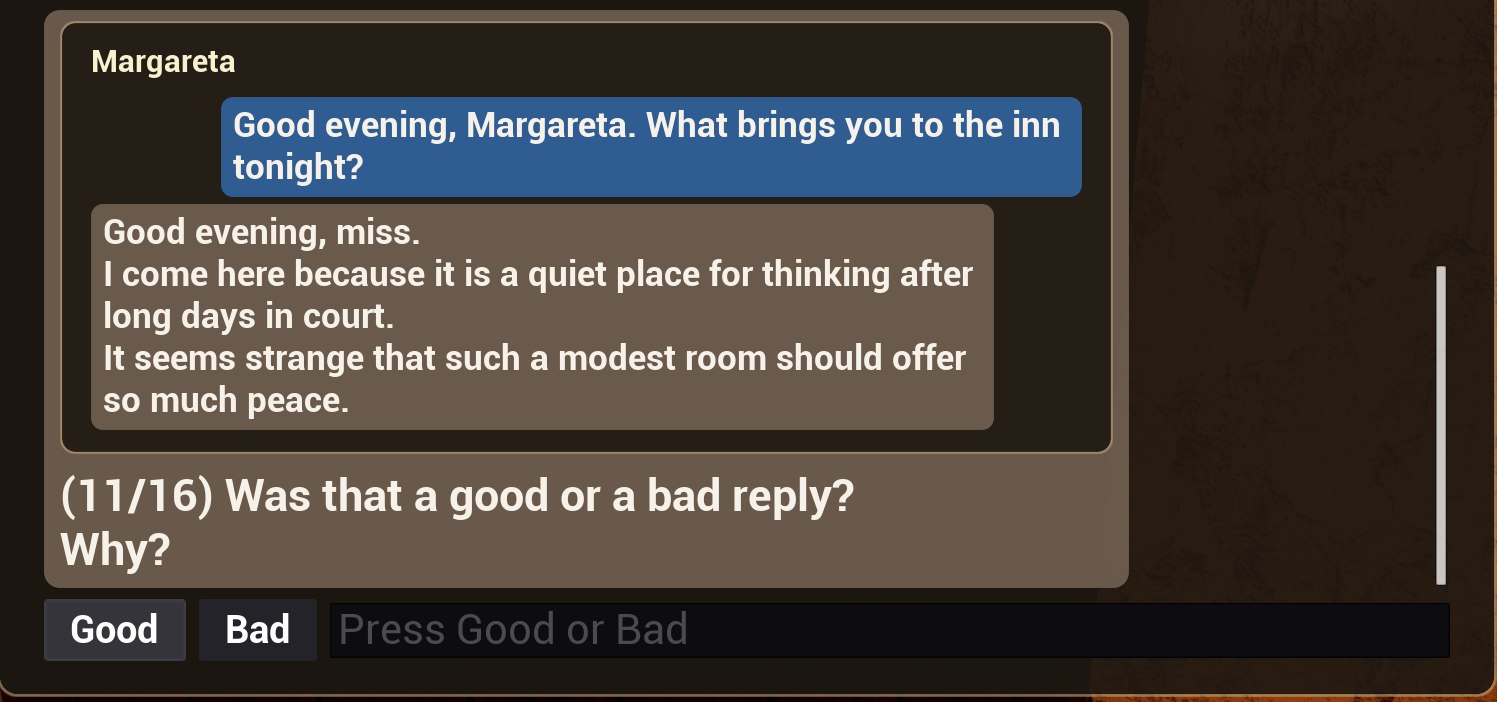
The feedback form quotes a real reply the tester saw and asks whether it was any good.
The feedback form is a door at the end of the playtest. It is a subclass of the dialogue component, so the questions arrive as a chat in the same panel the tester already knows. The answer types are built at runtime: typed text, sliders, and yes or no with a follow-up question. A {Chat} token in a question pulls in a real exchange from the tester’s own conversations, which gives us ratings on actual AI output. When the tester is done, the answers and dialogue log are written next to the game with their PC specs, and the browser opens the upload page for that exact build.
The loading screen covers everything the first seconds of a play session would otherwise stutter on. UGameLoadingSubsystem pauses the game and uses a core ticker that keeps running during the pause. It waits on streaming levels, PSO precaching, the shader pipeline cache, the AI servers and the NPC read-aheads, and shows “Loading Game” or “Compiling Shaders” depending on what is left.
The website


ratterstudios.com started out as a Lovable prototype. I turned it into a standalone TanStack Start app with Vite, Bun, Tailwind and shadcn/ui, redesigned it, and replaced the placeholder imagery with real shots from the game. Every page is prerendered by GitHub Actions and deployed to GitHub Pages under the studio’s domain, so the site itself needs no server. The team publishes game updates through Pages CMS with their GitHub organization login, and the game page carries schema.org VideoGame data for search engines.
Downloads. The list of playtest builds is read live from our GitHub releases, so publishing a release is all it takes to put a build on the site. Builds are too large for a single release file and get uploaded in parts. A Cloudflare Worker streams those parts as one continuous download with resume support, and a Durable Object counts completed downloads only.
Streaming without spending CPU time
Workers on the free plan get very little CPU time, so a multi-gigabyte download has to go through a native pipe rather than JavaScript. FixedLengthStream also errors if the stream ends short, so a failure upstream can never look like a finished file.
// Counted once the last byte is sent; the 10% minimum ignores small tail requests.
const counted = end === total - 1 && length >= total / 10;

// Native pipe (no CPU time) that errors instead of ending short.
const { readable, writable } = new FixedLengthStream(length);
ctx.waitUntil(
  streamParts(parts, start, end, writable)
    .then(async () => {
      if (counted) await counter(env).increment(`${tag}/${file}`);
    })
    .catch(async (err) => {
      console.error(err);
      await writable.abort(err).catch(() => {});
    }),
);
return new Response(readable, { status, headers });
Feedback. The newest build has a Feedback button that leads to a page for that build, where testers drop the files from the in-game form. A second Worker checks the origin and rate limits by IP, then hands the upload to a Durable Object, since encoding attachments takes more than the 10 ms of CPU a free Worker gets. It then sends the files to us through Resend, with Reply-To set to the tester.
Tech lead
- GitHub and Git. I set up the entire Ratter Studios GitHub organization and take care of everything Git related: the repositories, Git LFS, the attributes and ignore rules, and getting the team onboarded.
- Project structure. I set up the naming conventions and folder structure the team works in.
- Engine upgrades. I moved the project from Unreal 5.7 to 5.8 and on to 5.8.2, including the build settings and .NET changes.
- Keeping the project healthy. I traced levels that looked corrupted to LFS pointers being text-merged, and fixed it for good with a binary merge rule. I also learned to spot a commit from a stale working tree by matching asset blobs against history, and to revert it cleanly.
- Merging. I bring the team’s feature branches together, compile-checking the merge result in a scratch copy before it lands on main.
- Packaging. I package the Windows builds, track down cook failures, guard editor-only code so that the game target compiles, and strip what a build does not need.
- Releases. Five public playtest builds so far, from the first alpha in September 2026.
Community
I post the playtest announcements on our community Discord and set up the Patreon integration that gives patrons their Discord roles. We also reached out to Stockholmers with a post on r/stockholm, which got a big response.
The team
None of this exists without the rest of Ratter. On the code side, that is Lily Clairevelle, Linda Winther, Henrik Göransson and Ismail Güven on AI, with Ismail also behind the customer behaviour, and Daniel Aldén on the cooking. Leon Cederberg works on the level and narrative, Sebastian Turku on design, and Patric Svedberg on animation.
-Jamie
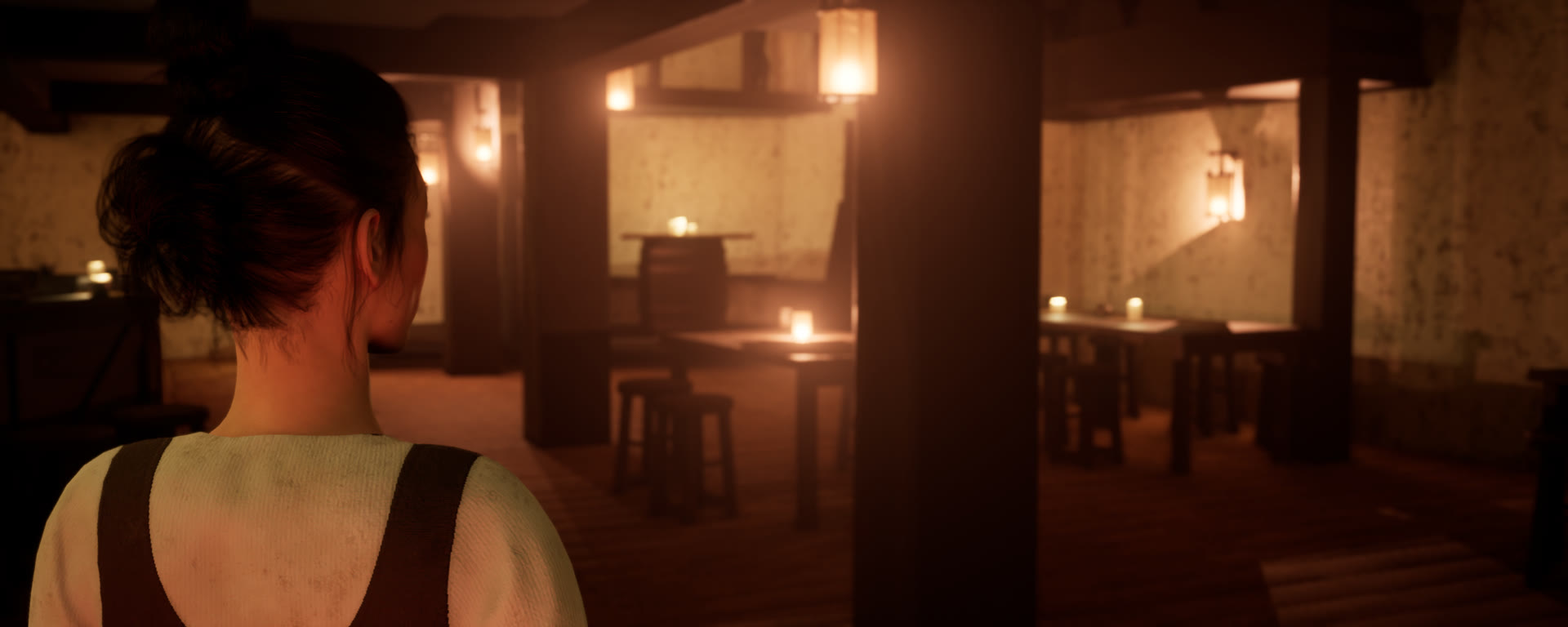
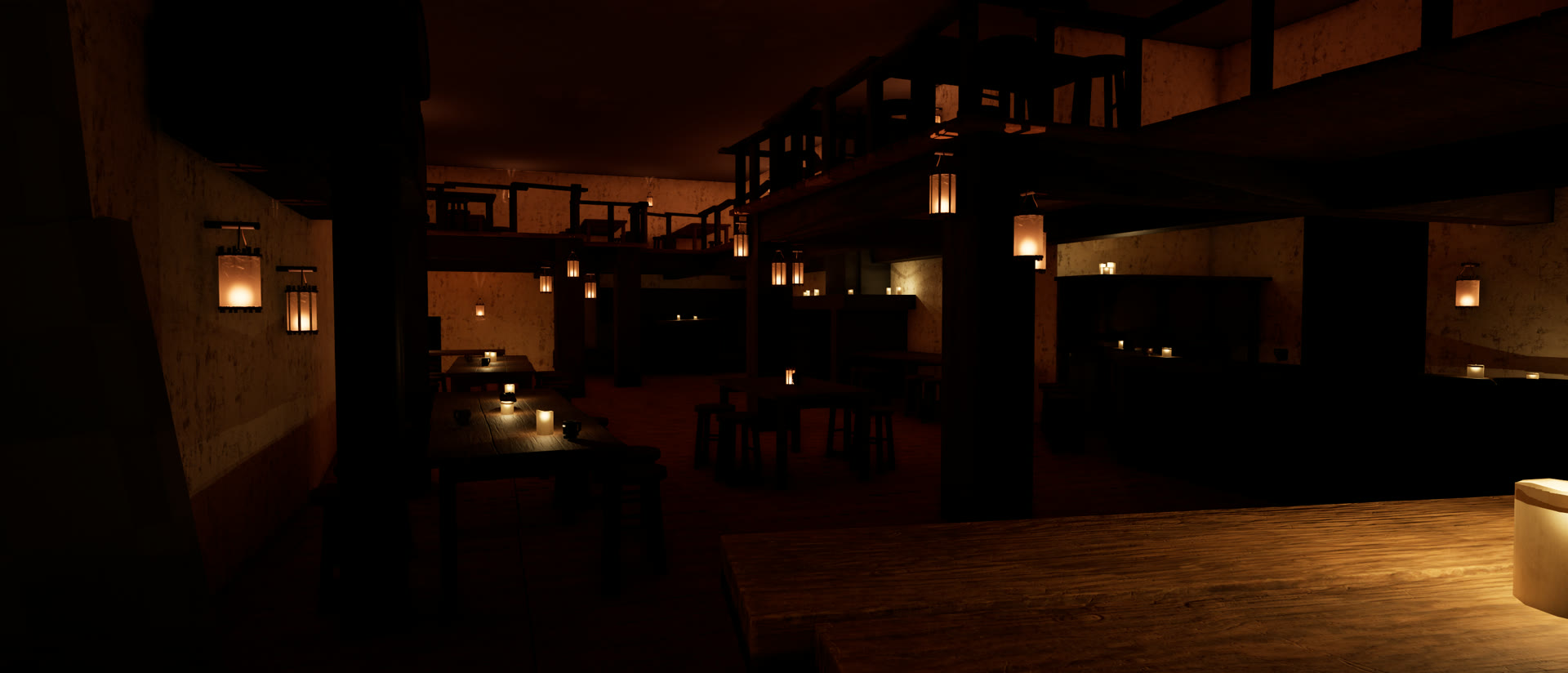
Here are some Stockholm1646 images!


Check out the studio and the game here: Ratter Studios, Stockholm1646 and our Discord server